

As a VFD parts supplier, I've gotten tons of questions from clients about how to adjust the parameters of VFD parts. It's a game - changer in getting the most out of your variable frequency drives (VFDs), so let's dig right in.
Why Parameter Adjustment is Crucial
First off, let's talk about why getting those parameters right is so important. A VFD is all about controlling the speed and torque of an electric motor. By adjusting its parameters, you can make the motor run more efficiently, reduce energy consumption, and prevent over - heating. This not only saves you money in the long run but also extends the lifespan of your motor and the VFD itself.
For instance, if you set the acceleration and deceleration times too short, the motor might draw too much current during start - up and shut - down. This can lead to tripping the VFD's protection mechanisms or even causing damage to the motor windings. On the other hand, if the times are set too long, the system response will be sluggish, which might not meet the operational requirements.
Basic Parameters and Their Adjustment
Frequency Settings
The most fundamental parameter is the frequency setting. In a standard AC power supply, the frequency is usually 50 or 60 Hz. However, VFDs can adjust this frequency to control the motor speed. The formula for motor speed (N) is (N = \frac{120 \times f}{P}), where (f) is the frequency and (P) is the number of poles of the motor.
To adjust the frequency, you first need to refer to the VFD's user manual. Most modern VFDs have a digital display and keypad where you can directly input the desired frequency values. Start by setting the minimum and maximum frequency limits according to your motor's specifications. For example, if your motor is designed to run between 10 Hz and 50 Hz, set these values in the VFD.
Acceleration and Deceleration Times
As mentioned earlier, the acceleration and deceleration times are critical for a smooth operation. To adjust these times, locate the relevant parameters in the VFD menu. The acceleration time determines how long it takes for the VFD to increase the output frequency from 0 Hz to the set maximum frequency, while the deceleration time is for the reverse process.
A good starting point is to use the default values provided by the VFD manufacturer. Then, based on your application requirements, you can fine - tune these times. If you're running a conveyor belt, for example, a longer acceleration time might be needed to prevent the materials on the belt from shifting too suddenly.
Advanced Parameters and Their Impact
Torque Boost
Torque boost is a parameter that can significantly enhance the motor's starting torque. In some applications, especially those with high inertia loads like large fans or pumps, the motor needs an extra torque boost during start - up.
To adjust the torque boost, find the corresponding parameter in the VFD menu. You can usually increase or decrease the torque boost percentage. Be careful not to set it too high, as it can cause over - current and over - heating of the motor. A trial - and - error approach is often the best way to find the optimal torque boost value for your application.
Carrier Frequency
The carrier frequency affects the smoothness of the motor operation and the level of electromagnetic interference (EMI). A higher carrier frequency generally results in a quieter motor operation but can also increase the switching losses in the VFD and generate more EMI.
To adjust the carrier frequency, look for the relevant parameter in the VFD settings. You need to balance between a smooth operation and minimizing the losses and EMI. In an environment where EMI is a concern, such as a control room with sensitive electronic equipment, you might want to set a lower carrier frequency.
Specialized VFD Parts and Their Parameter Adjustment
LCD Panel
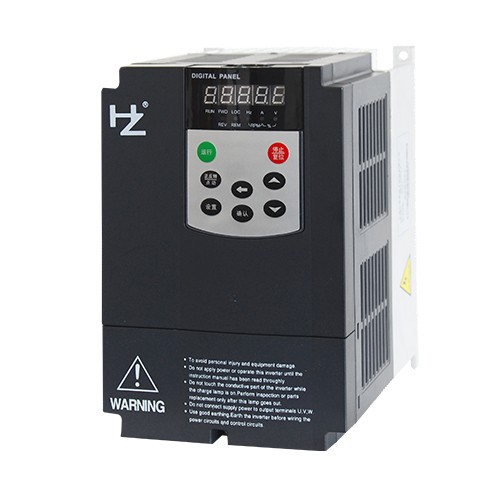
An LCD panel is a common part in VFDs, which provides a user - friendly interface for parameter setting and monitoring. When adjusting the parameters through the LCD panel, make sure you understand the navigation keys and the menu structure.
First, power on the VFD and access the parameter setting menu using the dedicated keys on the LCD panel. You can then use the up and down arrow keys to navigate through the parameters and the enter key to select or modify the values. Some LCD panels also support backlighting adjustment, which can be useful in different lighting conditions.
Braking Resistance for VFD
Braking resistance is used to dissipate the excess energy generated during motor deceleration. To adjust the parameters related to the braking resistance, you need to set the braking torque and the braking start frequency.
The braking torque determines how quickly the motor stops when the braking function is activated. You can increase or decrease this value according to your application needs. The braking start frequency defines the frequency at which the braking function starts to work. For example, if you set the braking start frequency to 20 Hz, the braking function will be activated when the output frequency of the VFD drops to 20 Hz.
Feedback Unit
A feedback unit is used to provide the VFD with information about the motor's actual speed or position. Common types of feedback units include encoders and resolvers.
When adjusting the parameters related to the feedback unit, you need to configure the input settings according to the type of feedback unit you're using. For example, if you're using an encoder, you need to set the number of pulses per revolution. This information allows the VFD to accurately calculate the motor's speed and adjust its output accordingly.
Troubleshooting Parameter Adjustment Issues
Even with careful adjustment, you might encounter some issues. If the motor doesn't start or stops unexpectedly, check the frequency settings and the acceleration/deceleration times. Also, make sure the torque boost is set correctly.
If you notice excessive heat or strange noises from the motor, it could be due to incorrect parameter settings. Check the carrier frequency and the braking resistance parameters. Sometimes, a simple reset of the VFD to its default settings can also help identify if the problem is caused by a misconfigured parameter.

Conclusion
Adjusting the parameters of VFD parts is both an art and a science. It requires a good understanding of the motor's operation, the VFD's functions, and the specific requirements of your application. By following the steps and guidelines mentioned above, you can optimize the performance of your VFD system and avoid many common problems.
As a VFD parts supplier, I'm always here to help you with any questions you might have about parameter adjustment or any other issues related to VFD parts. If you're interested in purchasing high - quality VFD parts or need more in - depth technical support, feel free to reach out for a discussion. We can work together to find the best solutions for your needs.
References
- "Variable Frequency Drives Handbook" by various industry experts
- Manufacturer's user manuals for different VFD models