

In the industrial realm, Variable Frequency Drives (VFDs) operating within the 660V - 690V range play a pivotal role in controlling the speed and torque of electric motors. These VFDs offer enhanced energy efficiency, precise motor control, and reduced mechanical stress on connected equipment. One useful feature that many industrial applications can benefit from is the automatic restart function of a VFD. This function can significantly reduce downtime in case of power interruptions or other temporary malfunctions. As a reliable supplier of 660V - 690V VFDs, I will guide you through the process of setting up the automatic restart function for these high - voltage drives.
Understanding the Automatic Restart Function
The automatic restart function of a VFD allows the drive to restart the motor automatically after a power outage or a fault condition has been resolved. This is particularly crucial in continuous - process industries where any interruption in motor operation can lead to significant production losses. By enabling this function, you can ensure that your production line resumes operation as quickly as possible, minimizing downtime and maintaining productivity.
Prerequisites for Setting the Automatic Restart Function
Before you start setting up the automatic restart function, there are a few prerequisites that you need to consider:
- Familiarize with the VFD Manual: Each VFD model has its own set of configuration parameters and procedures. It is essential to read and understand the user manual provided by the manufacturer. The manual will provide detailed information on how to access the configuration menu, the specific parameters related to the automatic restart function, and any safety precautions.
- Check the Power Supply: Ensure that the power supply to the VFD is stable and within the specified voltage range (660V - 690V). Unstable power can cause the VFD to malfunction or prevent the automatic restart from working correctly.
- Inspect the Motor and Load: Make sure that the motor and the connected load are in good condition. Any mechanical issues with the motor or the load can cause the VFD to trip again after a restart.
Steps to Set the Automatic Restart Function
The following steps will guide you through the process of setting the automatic restart function for a 660V - 690V VFD:

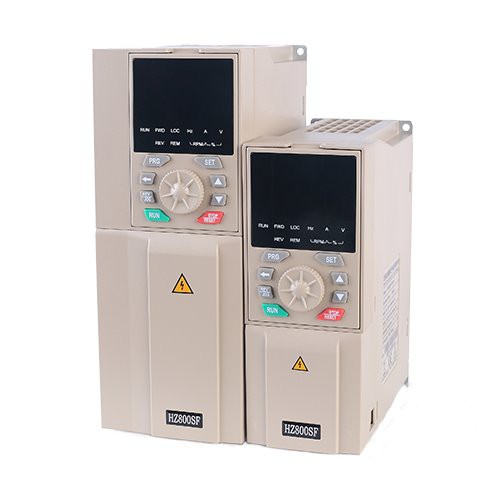
Step 1: Access the Configuration Menu
- Power on the VFD and wait for it to initialize.
- Use the control panel on the VFD to access the configuration menu. This usually involves pressing a specific button or combination of buttons, as described in the user manual.
Step 2: Locate the Automatic Restart Parameters
- Once you are in the configuration menu, navigate to the section related to the automatic restart function. The exact location of these parameters may vary depending on the VFD model.
- Look for parameters such as "Automatic Restart Enable", "Restart Delay Time", and "Restart Attempts".
Step 3: Enable the Automatic Restart Function
- Set the "Automatic Restart Enable" parameter to "Yes" or "On". This will activate the automatic restart feature of the VFD.
Step 4: Set the Restart Delay Time
- The restart delay time determines how long the VFD will wait after the power is restored or the fault is cleared before attempting to restart the motor. You can set this time based on your specific application requirements. For example, if you need to allow some time for the system to stabilize after a power outage, you can set a longer delay time.
Step 5: Configure the Restart Attempts
- The restart attempts parameter specifies the number of times the VFD will try to restart the motor if the first attempt fails. You can set this value according to your needs. If the motor fails to start after a certain number of attempts, the VFD may lock out and require manual intervention.
Step 6: Save the Configuration
- After you have set all the necessary parameters, save the configuration in the VFD. This usually involves pressing a "Save" or "Enter" button on the control panel.
Testing the Automatic Restart Function
Once you have set up the automatic restart function, it is important to test it to ensure that it is working correctly. You can perform a simple test by temporarily interrupting the power supply to the VFD and then restoring it. Observe the VFD to see if it restarts the motor automatically after the specified delay time.
Considerations and Best Practices
- Safety First: When testing the automatic restart function, make sure that all personnel are aware of the test and are clear of any moving parts.
- Documentation: Keep a record of the configuration settings for the automatic restart function. This will be useful for future reference and troubleshooting.
- Regular Maintenance: Perform regular maintenance on the VFD and the connected motor to ensure that the automatic restart function continues to work reliably.
Related VFD Products
As a 660V - 690V VFD supplier, we also offer a wide range of other VFD products that may be of interest to you:
- Single Phase VFD To 3 Phase Motor: This product allows you to use a single - phase power supply to drive a three - phase motor, providing a cost - effective solution for some applications.
- Synchronous Motor Drive: Our synchronous motor drives are designed to provide precise control of synchronous motors, offering high efficiency and performance.
- 2.2KW VFD: This compact and powerful VFD is suitable for a variety of small - to - medium - sized motor applications.
Conclusion
Setting up the automatic restart function of a 660V - 690V VFD is a relatively straightforward process that can bring significant benefits to your industrial operations. By following the steps outlined in this guide and considering the best practices, you can ensure that your VFD restarts the motor automatically after a power outage or fault, minimizing downtime and maintaining productivity.
If you are interested in our 660V - 690V VFD products or need further assistance with setting up the automatic restart function, please feel free to contact us for procurement and negotiation. We are committed to providing high - quality VFDs and excellent customer service to meet your industrial needs.
References
- Manufacturer's user manuals for 660V - 690V VFDs
- Industrial control system design and operation guidelines