

As a supplier of 3.7KW Variable Frequency Drives (VFDs), ensuring that these devices are working properly is crucial for both us and our customers. A well - functioning VFD can optimize motor performance, save energy, and prevent costly breakdowns. In this blog, I'll share some effective ways to check if a 3.7KW VFD is working as it should.
Visual Inspection
The first step in checking a VFD is a visual inspection. This is a simple yet important process that can reveal obvious signs of damage or malfunction.
- External Damage: Carefully examine the VFD's enclosure for any visible cracks, dents, or signs of physical impact. These could potentially lead to internal component damage or affect the VFD's ability to dissipate heat. If the VFD has been installed in a harsh environment, look for signs of corrosion on the enclosure, which might indicate that the internal components are also at risk.
- Fan and Heat Sink: The fan and heat sink are vital for cooling the VFD. Check if the fan is spinning freely. A stuck or noisy fan can cause overheating, which may lead to premature failure of the VFD. Also, inspect the heat sink for dust or debris accumulation. A clogged heat sink can reduce its cooling efficiency, so it may need to be cleaned regularly.
- Wiring and Connections: Inspect all the wiring and connections inside the VFD. Loose, frayed, or damaged wires can cause electrical problems such as short - circuits or intermittent operation. Make sure all connectors are firmly seated and that there are no signs of overheating, such as discolored wires or melted insulation.
Power - on Checks
After a successful visual inspection, it's time to power on the VFD and perform some basic checks.
- Power Indication: When you power on the VFD, check if the power indicator lights up. This is a basic sign that the VFD is receiving power. If the power indicator doesn't come on, there could be an issue with the power supply, such as a blown fuse or a faulty power cable.
- Display and Control Panel: The display and control panel of the VFD should function properly. Check if the display shows the correct information, such as the input voltage, output frequency, and motor speed. Try adjusting the settings on the control panel, such as the frequency setpoint. If the display is blank, shows incorrect values, or if the control panel doesn't respond to your inputs, there may be a problem with the internal electronics of the VFD.
- Audible Checks: Listen for any abnormal noises when the VFD is powered on. A humming or buzzing sound could indicate a problem with the internal components, such as a loose inductor or a faulty capacitor. If you hear a loud clicking or popping sound, it could be a sign of a serious electrical fault, and you should immediately power off the VFD to prevent further damage.
Load Testing
Once the VFD passes the power - on checks, it's time to perform load testing to ensure that it can operate the motor effectively.

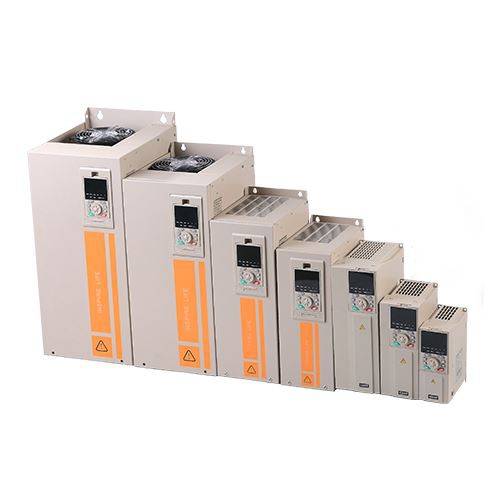
- Motor Startup: Start the motor connected to the VFD and observe its startup behavior. The motor should start smoothly without any jerks or hesitation. A rough startup could indicate issues with the VFD's output waveform or incorrect parameter settings. Check if the motor reaches the set speed within the expected time.
- Speed Control: Test the VFD's speed control functionality. Gradually increase and decrease the output frequency of the VFD and observe how the motor speed changes. The motor speed should change proportionally to the frequency change. If there is a significant lag or if the motor speed doesn't change at all, there may be a problem with the VFD's speed control algorithm or the feedback loop.
- Torque and Power Output: Under normal operating conditions, the VFD should be able to provide sufficient torque and power to the motor. Monitor the motor's performance under different loads. You can use a torque meter or a power analyzer to measure the actual torque and power output. If the motor struggles to operate under load or if the power consumption is much higher than expected, it could indicate that the VFD is not providing the correct output.
Parameter Checks
The parameters of a VFD are crucial for its proper operation. Incorrect parameter settings can lead to various problems, including motor damage and inefficient operation.
- Factory Settings: First, check if the VFD's parameters are set to the factory - recommended values. Some common parameters include the motor rated voltage, rated current, rated frequency, and acceleration/deceleration time. If these parameters are not set correctly, the VFD may not be able to control the motor effectively.
- Application - Specific Settings: In addition to the basic parameters, there may be application - specific settings that need to be configured. For example, if the VFD is used in a conveyor system, you may need to set the appropriate speed profile and torque limits. Make sure these settings are correct for your specific application.
- Parameter Consistency: Check for any inconsistent parameter settings. For example, if the maximum frequency setting is lower than the rated frequency of the motor, it can limit the motor's performance. Ensure that all the parameters are consistent with each other and with the requirements of the motor and the application.
Diagnostic Tools
Modern VFDs are often equipped with diagnostic tools that can help you identify problems more accurately.
- Error Codes: Most VFDs display error codes when a problem is detected. Refer to the VFD's user manual to understand the meaning of these error codes. Error codes can provide valuable information about the nature of the problem, such as over - current, over - voltage, or a communication fault.
- Built - in Monitoring Functions: Many VFDs have built - in monitoring functions that can display real - time information about the VFD's operation, such as the input/output voltage, current, and temperature. Use these monitoring functions to track the VFD's performance over time and to detect any abnormal trends.
- External Diagnostic Equipment: In some cases, you may need to use external diagnostic equipment, such as an oscilloscope or a multimeter, to perform more detailed checks. An oscilloscope can be used to analyze the VFD's output waveform, while a multimeter can be used to measure the voltage, current, and resistance at different points in the VFD circuit.
Regular Maintenance
Regular maintenance is essential to keep the 3.7KW VFD working properly.
- Cleaning: As mentioned earlier, keep the VFD's enclosure, fan, and heat sink clean. Use a soft brush or compressed air to remove dust and debris. Regular cleaning can prevent overheating and extend the lifespan of the VFD.
- Calibration: Periodically calibrate the VFD to ensure that its output parameters are accurate. This may involve adjusting the voltage, frequency, and current settings using a calibrated reference source.
- Component Replacement: Over time, some components of the VFD may wear out or fail. Keep a stock of common replacement components, such as fuses, capacitors, and fans, and replace them as needed.
In conclusion, checking if a 3.7KW VFD is working properly involves a combination of visual inspection, power - on checks, load testing, parameter checks, and the use of diagnostic tools. By following these steps, you can ensure that your VFD is operating efficiently and reliably.
If you are in the market for a high - quality 3.7KW VFD, we are here to help. As a professional supplier, we offer a wide range of VFDs, including Inverter Drive, Synchronous Motor Drive, and Outdoor VFD. Our products are known for their reliability, performance, and energy - saving features. Contact us for more information and to discuss your specific requirements. We look forward to working with you to find the perfect VFD solution for your application.
References
- Variable Frequency Drive User Manuals
- Electrical Engineering Textbooks on Motor Control and Power Electronics
- Industry Standards for VFD Installation and Maintenance