

As a provider of 15KW Variable Frequency Drives (VFDs), I understand the importance of multi-speed control in various industrial and commercial applications. Multi-speed control allows for greater flexibility and efficiency in operating electric motors, enabling users to adjust the motor speed according to the specific requirements of their processes. In this blog post, I will guide you through the process of setting up multi-speed control on a 15KW VFD.
Understanding the Basics of Multi-Speed Control
Before we dive into the setup process, let's briefly review the concept of multi-speed control. A VFD is an electronic device that controls the speed of an alternating current (AC) motor by varying the frequency and voltage supplied to the motor. Multi-speed control on a VFD involves configuring the drive to operate the motor at multiple preset speeds. This can be achieved through various methods, such as using digital inputs, analog inputs, or through a communication protocol.
Step 1: Hardware Installation and Connection
The first step in setting up multi-speed control on a 15KW VFD is to ensure that the VFD is properly installed and connected to the motor and other external devices. Here are the key points to consider during the hardware installation:
- Mounting the VFD: Install the VFD in a clean, dry, and well-ventilated location away from sources of heat, dust, and moisture. Make sure the VFD is securely mounted to a suitable surface using the appropriate mounting hardware.
- Wiring the VFD to the Motor: Connect the output terminals of the VFD to the motor according to the motor's wiring diagram. Ensure that the wiring is properly sized and insulated to handle the rated current of the motor.
- Connecting External Devices: Connect any external devices, such as digital input switches, analog input sensors, or a programmable logic controller (PLC), to the appropriate terminals on the VFD. Refer to the VFD's user manual for the specific wiring instructions.
Step 2: Initial Configuration of the VFD
Once the hardware installation is complete, the next step is to perform the initial configuration of the VFD. This involves setting the basic parameters of the VFD, such as the motor rated parameters, the control mode, and the acceleration and deceleration times. Here's how you can do it:
- Accessing the Parameter Menu: Use the VFD's control panel or a programming device to access the parameter menu. The specific method of accessing the menu may vary depending on the make and model of the VFD.
- Setting the Motor Parameters: Enter the motor's rated power, voltage, current, frequency, and speed into the appropriate parameters in the VFD. These parameters are crucial for the VFD to accurately control the motor.
- Selecting the Control Mode: Choose the appropriate control mode for your application. Common control modes include V/f control, vector control, and sensorless vector control. The choice of control mode depends on the specific requirements of your motor and the application.
- Setting the Acceleration and Deceleration Times: Adjust the acceleration and deceleration times to suit the requirements of your application. The acceleration time is the time it takes for the motor to reach its set speed from a standstill, while the deceleration time is the time it takes for the motor to come to a stop from its set speed.
Step 3: Configuring Multi-Speed Control
After the initial configuration of the VFD is complete, you can proceed to configure the multi-speed control. There are several ways to configure multi-speed control on a 15KW VFD, and the method you choose depends on the available input options and the specific requirements of your application. Here are some common methods:
Using Digital Inputs
One of the simplest ways to configure multi-speed control is by using the digital inputs on the VFD. Most VFDs have several digital input terminals that can be used to select different speed settings. Here's how you can set it up:
- Assigning Digital Inputs to Speed Settings: In the VFD's parameter menu, assign each digital input to a specific speed setting. For example, you can assign digital input 1 to speed 1, digital input 2 to speed 2, and so on.
- Setting the Speed Values: Enter the desired speed values for each speed setting in the VFD's parameter menu. The speed values can be specified in terms of frequency, RPM, or a percentage of the motor's rated speed.
- Testing the Multi-Speed Control: Once the digital inputs are assigned and the speed values are set, test the multi-speed control by activating each digital input and verifying that the motor runs at the corresponding speed.
Using Analog Inputs
Another way to configure multi-speed control is by using an analog input on the VFD. An analog input can be used to provide a variable signal that represents the desired speed. Here's how you can set it up:
- Connecting the Analog Input: Connect the analog input device, such as a potentiometer or a 4-20mA sensor, to the appropriate analog input terminal on the VFD.
- Configuring the Analog Input Parameters: In the VFD's parameter menu, configure the analog input parameters, such as the input type (voltage or current), the input range, and the scaling factor.
- Mapping the Analog Input to Speed: Map the analog input signal to the desired speed range in the VFD's parameter menu. For example, you can set the minimum analog input signal to correspond to the minimum speed and the maximum analog input signal to correspond to the maximum speed.
- Testing the Multi-Speed Control: Once the analog input is configured and mapped to the speed range, test the multi-speed control by varying the analog input signal and verifying that the motor speed changes accordingly.
Using a Communication Protocol
If you need more advanced control and monitoring capabilities, you can configure multi-speed control using a communication protocol, such as Modbus, Profibus, or Ethernet/IP. Here's how you can set it up:
- Enabling the Communication Interface: In the VFD's parameter menu, enable the communication interface and configure the communication parameters, such as the baud rate, the parity, and the stop bits.
- Connecting the Communication Cable: Connect the communication cable between the VFD and the control device, such as a PLC or a computer.
- Configuring the Communication Parameters on the Control Device: On the control device, configure the communication parameters to match those of the VFD. You will also need to program the control device to send the appropriate commands to the VFD to set the desired speed.
- Testing the Multi-Speed Control: Once the communication interface is enabled and the communication parameters are configured, test the multi-speed control by sending commands from the control device to the VFD and verifying that the motor runs at the corresponding speed.
Step 4: Fine-Tuning and Optimization
After the multi-speed control is set up and tested, you may need to fine-tune and optimize the configuration to ensure optimal performance and efficiency. Here are some key points to consider:
- Adjusting the Acceleration and Deceleration Times: If the motor experiences excessive jerk or overshoot during acceleration or deceleration, you may need to adjust the acceleration and deceleration times.
- Optimizing the Speed Settings: Depending on your application requirements, you may need to optimize the speed settings to achieve the desired performance and efficiency. For example, you may need to adjust the speed values to minimize energy consumption or to improve the quality of the process.
- Monitoring and Troubleshooting: Use the VFD's monitoring and diagnostic functions to monitor the motor's performance and to troubleshoot any issues that may arise. Most VFDs provide real-time monitoring of parameters such as motor current, voltage, speed, and temperature.
Conclusion
Setting up multi-speed control on a 15KW VFD is a straightforward process that involves hardware installation, initial configuration, and multi-speed control configuration. By following the steps outlined in this blog post, you can successfully set up multi-speed control on your 15KW VFD and achieve greater flexibility and efficiency in operating your electric motor.

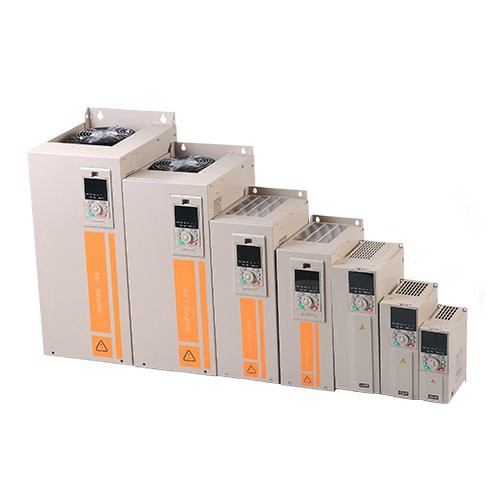
If you are interested in purchasing a 15KW VFD or need further assistance with setting up multi-speed control, please feel free to contact us for a procurement discussion. We are a leading provider of high-quality VFD For 120v Single Phase Motor and VFD For Motors, and our experienced team can help you find the right solution for your application. Our Frequency Drive Controller is designed to provide reliable and efficient motor control, and we offer comprehensive technical support to ensure your satisfaction.
References
- Manufacturer's User Manual for the 15KW VFD
- Electrical Installation and Wiring Standards
- Industrial Motor Control and Drives Literature